Conditions widget
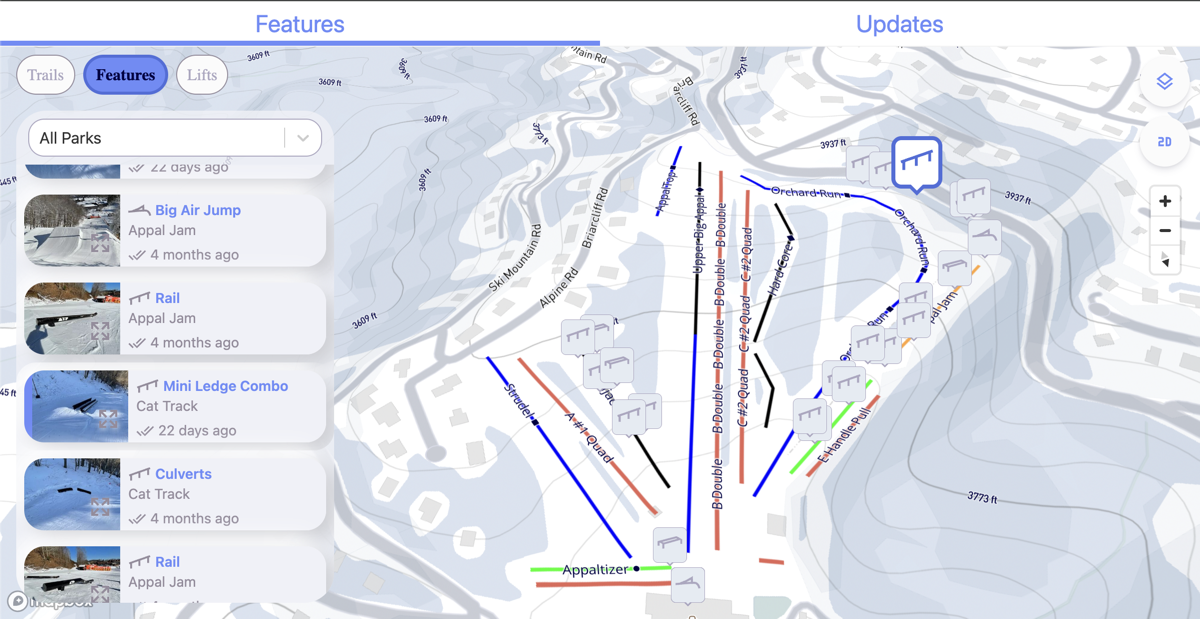
<ullr-widget> is the complete conditions experience in one element: an
interactive map of the mountain beside a details panel your visitors can browse.
The panel has tabs for terrain park features, trails and lifts, plus the updates
your crew posts through the day.
Use it when you want a single “conditions” page and do not want to assemble one out of the smaller embeds. If you only need a map, or only a status table, the interactive map, trail list and lift list are lighter.
Install
<script type="module" src="https://widget.ullr.ski/web-components/ullr-widget.js"></script>

<ullr-widget
  apiKey="1a2b3c4d5e6f.yourPublishableKey"
  areaId="your-area-id"
  sport="SNOW"
  showFeatures="true"
  showTrails="true"
  showLifts="true"
  initialMapStyle="VECTOR"
  units="imperial"
  theme="#6B8CF9"
  style="display:block;position:relative;height:600px"
></ullr-widget>
The widget fills its container, so it needs an explicit height — without one it
collapses to nothing and the page looks empty. The style attribute above is
what the dashboard generates; a CSS rule works just as well.
Required scopes
resorts:read, features:read and trails:read, plus updates:read. Add
lifts:read when showLifts="true".
The widget fetches features and trails whichever layers you switch on —
showFeatures and showTrails only control what it draws, not what it
requests. So a widget showing lifts alone still needs features:read and
trails:read, or those calls 403 and the panel stays empty. Only lifts are
fetched conditionally.
If you hide the Updates tab with hideParkLogs="true", you can drop
updates:read.
Attributes
Common attributes
Shared by all four embeds.
apiKeystringRequired{id}.{secret}. Sent as the api-key header on every request the element makes. Without it the element logs an error and renders nothing.areaIdstringRequiredsportSNOW | BIKEOptionalSNOWthemestringOptional#6B8CF9. Three- or six-digit hex only; anything else is ignored and the sport default is used. The secondary colour is derived automatically.#6B8CF9 (snow) / #50A162 (bike)timestampnumberOptionalfeatures:readHistory and trails:readHistory, plus lifts:readHistory when showLifts is on. The live scope is not enough on its own: without the history scope the request is refused and the embed renders empty, with no error shown to your visitors. The area and the Updates tab are always read live, so resorts:read and updates:read are unchanged — the Updates tab still shows current reports even in a historical view.ullrKeystringOptionalapiKey, kept so older snippets keep working. Only read when apiKey is absent. Use apiKey in new code.Widget options
hideParkLogsbooleanOptionalfalsedefaultEntityFEATURES | TRAILS | LIFTSOptionalFEATURES (TRAILS when sport is BIKE)showFeaturesbooleanOptionaltrueshowTrailsbooleanOptionalfalseshowLiftsbooleanOptionalfalseinitialMapStyleVECTOR | SATELLITEOptionalVECTOR is the topographic style.VECTORunitsimperial | metricOptionalimperialenableCooperativeGesturesbooleanOptionalfalsemapDefaultLatitudenumberOptionalthe area's configured defaultmapDefaultLongitudenumberOptionalthe area's configured defaultmapDefaultBearingnumberOptionalthe area's configured defaultmapDefaultPitchnumberOptional45enableMultiSelectbooleanOptionalfalseenableEventsFeatureSelectionbooleanOptionalullr-feature-selected, so embeds on the same page stay in sync when a feature is selected. Switches on both directions at once.falseenableEventsTrailSelectionbooleanOptionalullr-trail-selected, so embeds on the same page stay in sync when a trail is selected. Switches on both directions at once.falseenableEventsLiftSelectionbooleanOptionalullr-lift-selected, so embeds on the same page stay in sync when a lift is selected. Switches on both directions at once.falseEvents
The widget speaks the same selection protocol as the other three embeds, so it
stays in sync with a map or a
trail list on the same page. Each event is off until you
set the matching enableEvents…Selection attribute above. See
syncing embeds with events for the protocol and worked
examples.
Emitted
Dispatched on window when a visitor selects something in the widget.
ullr-feature-selecteddetail: { featureId: string, senderId: string }enableEventsFeatureSelection.ullr-trail-selecteddetail: { trailId: string, senderId: string }enableEventsTrailSelection.ullr-lift-selecteddetail: { liftId: string, senderId: string }enableEventsLiftSelection.Listened for
Sent by another embed — or by your own code — these change what the widget is showing.
ullr-feature-selecteddetail: { featureId: string, senderId: string }ullr-trail-selecteddetail: { trailId: string, senderId: string }ullr-lift-selecteddetail: { liftId: string, senderId: string }// select a trail in the widget from your own code
window.dispatchEvent(new CustomEvent('ullr-trail-selected', {
detail: { trailId: 'a1b2c3d4-…', senderId: 'my-site' },
bubbles: true,
composed: true,
}));Older event names
The widget originally used its own vocabulary, with a bare id string as the payload. Those names still work, so pages written against them need no changes.
ullr-select-feature / -trail / -liftdetail: string — the idullr-feature-selected and friends.ullr-external-select-feature / -trail / -liftdetail: string — the idUse the standard events for anything new. The old names are kept working, but they are widget-specific — the map and the list elements have never spoken them.
Notes
- Layer defaults differ from the dashboard. The element defaults to features on, trails and lifts off. The dashboard configurator defaults all three on and always writes them into the snippet — so a hand-written tag that omits them will show less than the one the dashboard generates.
themeworks here and on the other three embeds, but the dashboard only offers a colour picker for this one. Set it by hand elsewhere if you want it.- The Updates tab reads park reports through the Public API, so a key without
updates:readshows an empty tab rather than an error. Hide it withhideParkLogs="true"if you are not using it. - A page rarely needs the widget and the smaller embeds, since the widget already contains a map and its own lists — but the combination works if you want it, and stays in sync through selection events.