Trail list
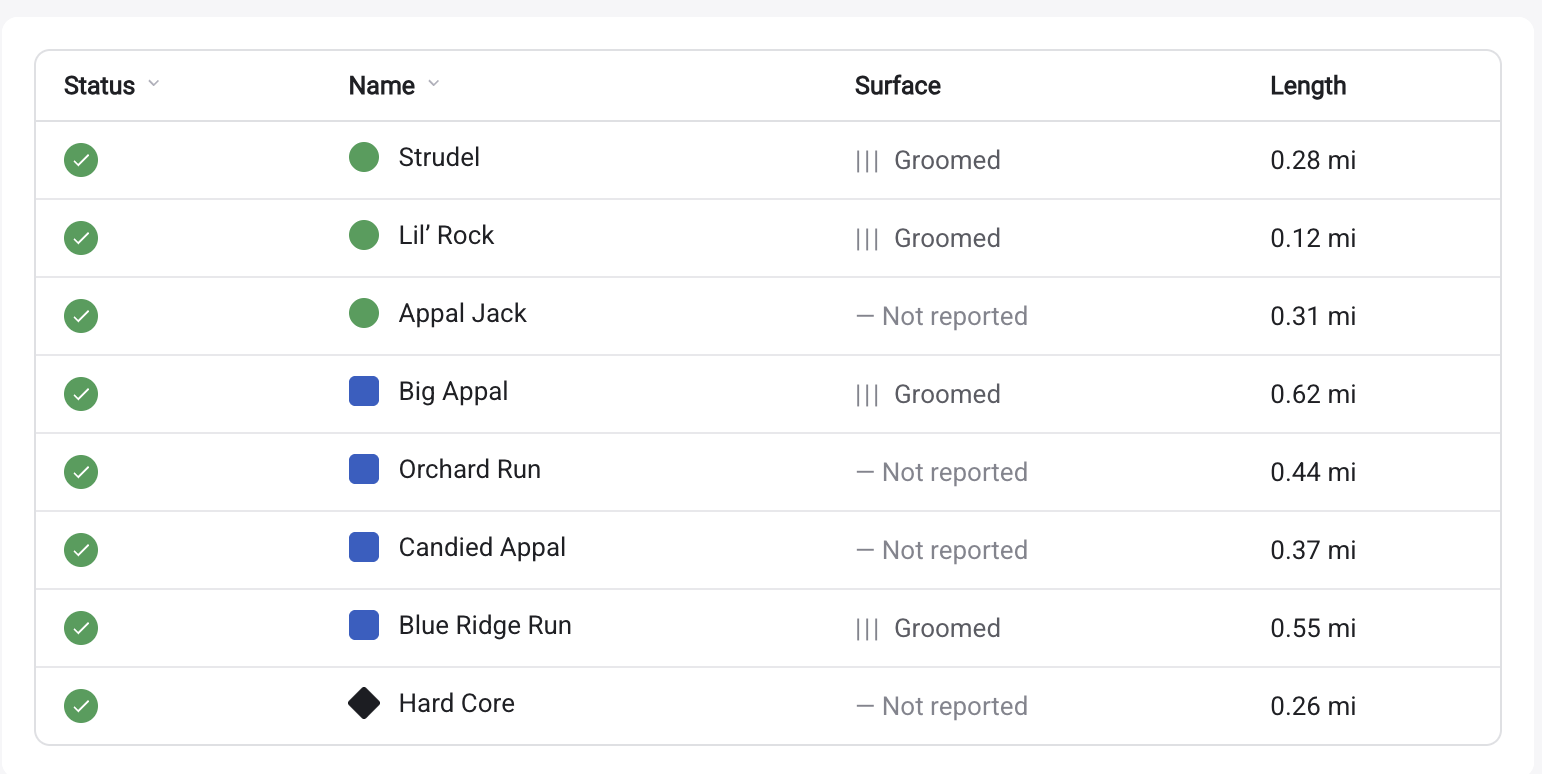
<ullr-trail-list> is a status table: every trail with its current status,
surface conditions, length and permitted activities. Visitors can sort it by any
column you allow.
It is the most-used embed, because it is the one that answers “what is open?” without a map. It also has an auto-scroll mode built for TVs at the base area — see TVs & kiosks.
Install
<script type="module" src="https://widget.ullr.ski/web-components/ullr-trail-list.js"></script>

<ullr-trail-list
  apiKey="1a2b3c4d5e6f.yourPublishableKey"
  areaId="your-area-id"
  sport="SNOW"
  visibleColumns="status,name,surface,length"
  units="imperial"
></ullr-trail-list>
The list sizes itself to its content, so unlike the map-based embeds it does not need an explicit height.
Required scopes
trails:read, and nothing else — the list reads the trails endpoint and never
asks for the area itself.
Columns
| Key | Shows |
|---|---|
status | Open / closed / grooming indicator |
name | Trail name |
surface | Surface conditions |
length | Trail length, in the chosen units |
allowedActivities | Which activities the trail permits |
visibleColumns controls both which columns appear and their order:
visibleColumns="name,status" puts the name first. The dashboard turns on
status,name,surface,length and leaves allowedActivities off.
Attributes
Common attributes
Shared by all four embeds.
apiKeystringRequired{id}.{secret}. Sent as the api-key header on every request the element makes. Without it the element logs an error and renders nothing.areaIdstringRequiredsportSNOW | BIKEOptionalSNOWthemestringOptional#6B8CF9. Three- or six-digit hex only; anything else is ignored and the sport default is used. The secondary colour is derived automatically.#6B8CF9 (snow) / #50A162 (bike)timestampnumberOptionaltrails:readHistory. The live scope is not enough on its own: without the history scope the request is refused and the embed renders empty, with no error shown to your visitors.ullrKeystringOptionalapiKey, kept so older snippets keep working. Only read when apiKey is absent. Use apiKey in new code.Trail list options
visibleColumnsstringOptionalstatus, name, surface, length, allowedActivities.all columns, in the order abovesortableColumnsstringOptionalevery visible columnsortColumnsstringOptionalcolumn:direction pairs, e.g. status:asc,name:asc. Anything other than desc is treated as ascending.status:asc,name:ascunitsimperial | metricOptionalimperialautoScrollbooleanOptionalfalseautoScrollSpeednumberOptionalautoScroll is on.30autoScrollPageDurationnumberOptionalautoScroll is on.10000scalenumberOptional1enableEventsTrailSelectionbooleanOptionalullr-trail-selected, so embeds on the same page stay in sync when a trail is selected. Switches on both directions at once.falseEvents
Set enableEventsTrailSelection="true" and the list joins the page-wide
selection channel — it announces what a visitor tapped, and highlights whatever
another embed selects. The one attribute switches on both directions. See
syncing embeds with events for the protocol and worked
examples.
Emitted
ullr-trail-selecteddetail: { trailId: string, senderId: string }enableEventsTrailSelection.Listened for
ullr-trail-selecteddetail: { trailId: string, senderId: string }autoScroll animation is running, so a kiosk loop is never interrupted.Notes
- Lock the sort on unattended displays. A visitor — or a stray touch on a
kiosk — can re-sort the table and leave it that way. Set
sortableColumns=""to make it read-only, or list only the columns you are happy to have clicked. sortColumnsaccepts several pairs, applied in order:status:asc,name:ascgroups by status and alphabetises within each group.- There is also a hosted full-screen version of this embed for TVs that takes the same options as URL query parameters — see TVs & kiosks.
Pair this with the interactive map and set
enableEventsTrailSelection="true" on both: selecting a trail in the list
flies the map to it, and tapping it on the map scrolls the list to that row.
Full example.